Holobox interactive learning for kids

Project Description

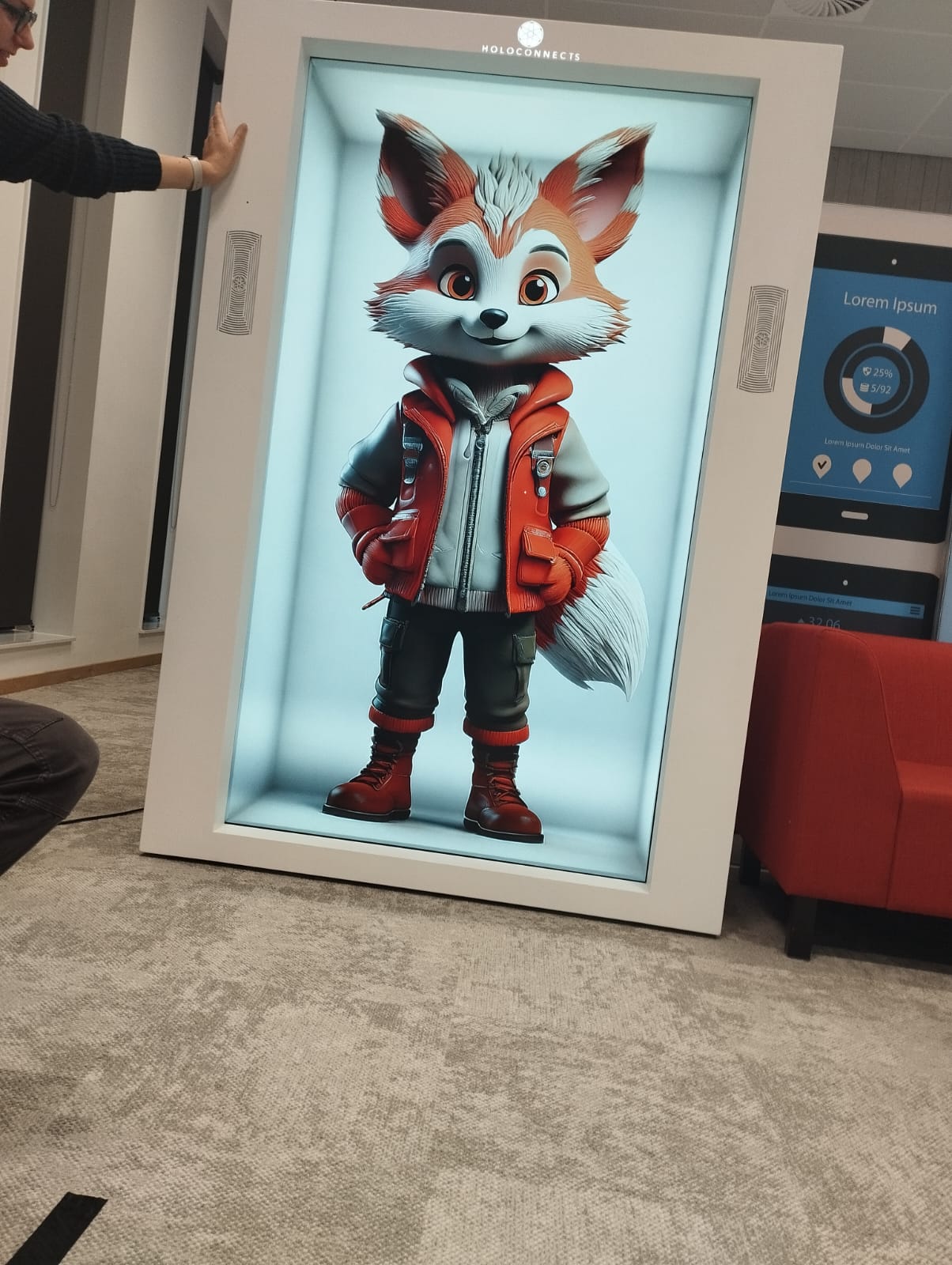
Project Holobox is an exciting research project focused on exploring how virtual characters can make learning more engaging for kids outside of traditional schools. The main feature of the project is a unique display system: a life-sized hollow box with a transparent screen that can show photos, videos, and web content. The big question we’re trying to answer is, "How can we help kids take charge of their learning journey?" The project is aimed at children between 8 and 12 years old.

The idea is to create an interactive learning experience where virtual characters can connect with kids through storytelling and fun, educational activities. By placing the Holobox in non-school environments, we hope to find new and creative ways for kids to learn and grow. To do this, we’ll need to think carefully about where to put the technology and what kind of content will keep kids interested while helping them learn. A key part of the project is doing research with kids to see how they interact with the virtual characters. This can be tricky because it’s super important to make sure the process is safe, respectful, and comfortable for them. Our goal is to gather useful feedback while ensuring kids feel happy and supported throughout the experience.

Identification Phase

In the Identification Phase of our Holobox project, we focused on laying the groundwork for a smooth and productive workflow. To start, we divided roles within the team, and my main focus was UX/UI design. This gave me the chance to think about how Holobox would look and feel for kids aged 8-12, ensuring it would be easy and fun for them to use. To keep everything organized and on track, we created a cooperation contract. This outlined our roles, responsibilities, and the way we’d work together. It was a great way to ensure everyone was clear about their tasks and how we’d collaborate as a team.

Using scrum

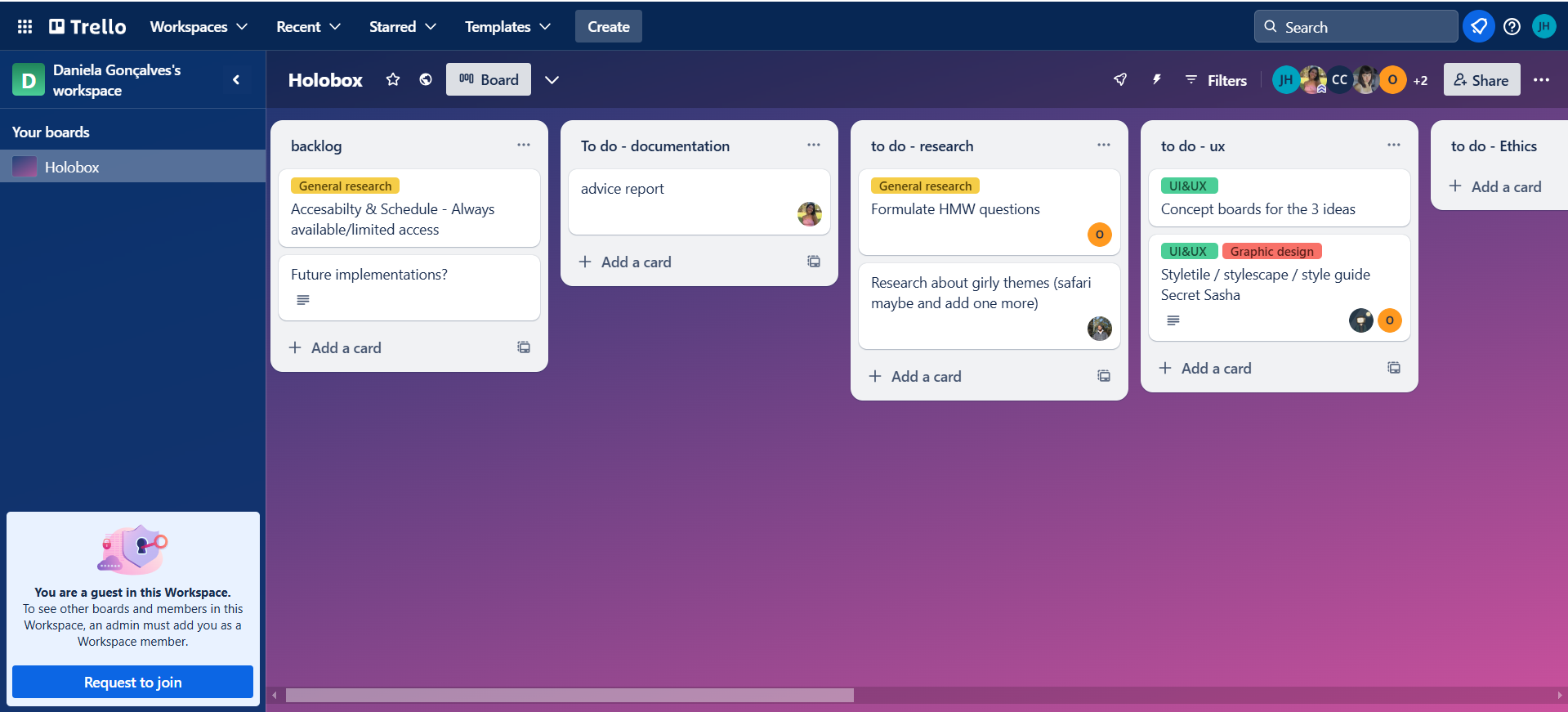
For managing our work, we chose Scrum because it’s flexible and helps break big tasks into smaller, more manageable steps. Daniella, our scrum master, kept everything running smoothly, making sure tasks were prioritized and deadlines were met. We used Trello to track our progress, with all tasks laid out clearly in the board. Each task was designed to be completed within a day and required a peer review before being marked as done. Chris, who checked most of the documentation, made sure everything was polished and up to standard. This system made it easier to stay organized and kept everyone accountable. It is also important to mention that after each sprint presentation we have a retrospective and then on our miro board we reflect on the things that we lacked with, thigs we did good and things we should improve on. That definately help our teamwork and workflow throughout the whole process.

Project Plan

Chris also created a detailed project plan that became our guide for the entire process. The plan broke down our work into four two-week sprints, outlining what needed to be accomplished at each stage. It included our main objectives, timelines, and the methodologies we’d use, such as Scrum and Human-Centered Design. The plan ensured that everyone was on the same page and aligned with our goals. It also highlighted how the Holobox would blend physical and digital learning in an engaging way.

What I Learned:

The project plan was super helpful because it kept us on track and made sure we knew what needed to be done at each stage. It clarified the scope, deliverables, and constraints, which helped us stay aligned with our main goal of creating something that educational and fun for the children.

Why It Was Helpful?

What we learned from this is how important it is to have a clear plan and structured timeline. It showed us how to balance the project's scope with the resources we had and how breaking the project into phases made it easier to manage. Overall, it helped us stay focused and ensured we were moving forward step by step.

Debrief Document

During Sprint 1, Chris worked on putting together the Debrief Document, which was basically a summary of everything we had done so far and what our next steps would be. It was an important piece to keep the team and the client on the same page about the project’s progress.

Chris was the main person behind the document, but I helped out a little by giving feedback and checking to make sure everything was clear and easy to follow. I didn’t do a lot, but I tried to support her whenever she needed an extra pair of eyes or a second opinion.

What I Learned:

Creating the debrief document taught us several important lessons. First, it highlighted how crucial good documentation is for tracking our progress and communicating clearly with everyone involved in the project. Having a well-organized record ensures that everyone is on the same page and can follow the project's developments easily. Second, it reinforced the value of teamwork. While my role in the process was minimal, assisting Chris gave me a firsthand look at how collaboration can really enhance the outcome. Even small contributions can make a difference when everyone works together. Lastly, I learned how essential structure is when presenting information. Chris did an excellent job organizing the document in a way that was clear and easy to understand. Observing her work showed me how effective presentation can make complex information accessible and engaging, which is something I aim to apply in my future work.

Why It Was Helpful?

The debrief document was really helpful for the project because it served several important purposes. First, it gave us an opportunity to reflect on what we had accomplished so far and identify areas that still needed attention. This reflection helped us make sure we were on the right track and could adjust as needed. Second, it helped keep everyone on the same page. With all the team members being able to refer to the document, it made planning the next steps much more straightforward, as everyone was aware of what had been done and what was still pending. Lastly, the debrief document acted as a guide for the next phase of the project. It ensured that we didn’t lose sight of our main goals and kept our focus on the bigger picture as we moved forward.

Even though my role in creating the document was small, it was a learning experience to see how everything came together. It helped me understand how important good communication and teamwork are, especially in a project like this.

How this phase influenced the project

The Identification Phase set a strong foundation for the project. Splitting roles ensured that each aspect of the project had dedicated attention, while the cooperation contract and Scrum workflow gave us a clear structure to follow. Using Trello kept our tasks visible and manageable, and the project plan gave us a clear roadmap for what’s to come.

Investigation Phase

The Holobox takes a fun and immersive approach, letting kids interact with content in ways that feel natural and exciting. Our goal is to design a system that adapts to the different needs and stages of a child’s development, making learning both engaging and effective. During the investigation phase of our project, we focused on understanding what children need and enjoy most to create an interactive experience that’s both educational and entertaining. This step was essential in making sure our design choices matched the abilities and expectations of our target audience.

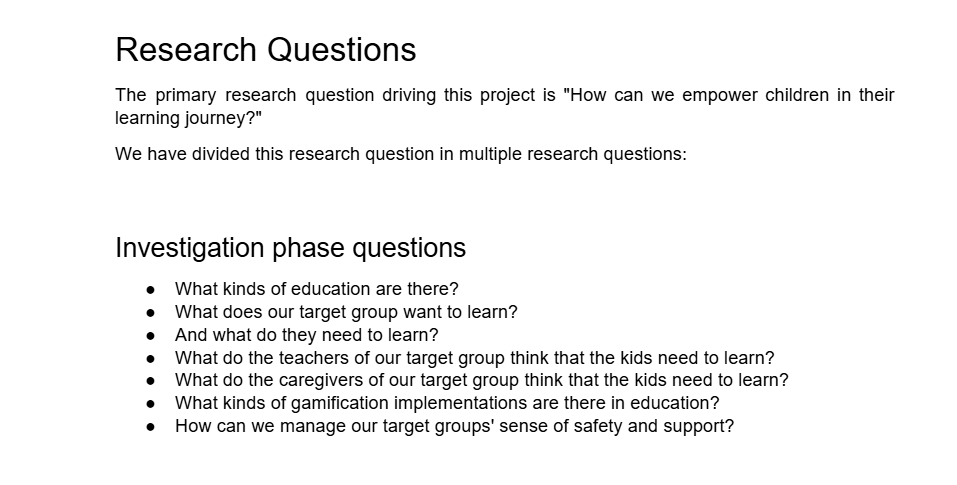
Research Questions

We came up with these research questions by first thinking about the main goal of the project: to help empower children in their learning journey. From there, we broke down this big question into smaller ones, focusing on different aspects like what kids need and want to learn, what teachers and caregivers think, and how gamification could be used in education. I also used ChatGpt and explained him what the project is about and it gave me some example questions that I reworked a bit and then Chris came up with the actual research questions.

The questions about different kinds of education helped us understand the bigger picture, so we could design the Holobox experience in the right way. By asking what kids want to learn and what teachers and caregivers think they should learn, we made sure the content we created was useful and engaging. It also showed us the importance of mixing fun with learning.

The question about gamification was really helpful because it made us think about how we could make the Holobox interactive and game-like, making it more fun and motivating for kids. We also thought a lot about how to make sure the kids felt safe and supported, which was important for both the kids and their parents to trust the experience.

In the end, these questions helped guide the whole project. They made sure we stayed focused on what the kids actually need and like in terms of learning, while also making sure the Holobox was fun and safe to use. Reflecting on these questions throughout the project helped us design a better learning tool.

Survey

The survey was created with a mix of multiple-choice and open-ended questions to balance quantitative and qualitative data. We distributed it online to reach a broad range of parents with children across different age groups. Questions were designed to explore the parents’ priorities, such as which skills they believe are essential, how children best learn, and the role of structured and unstructured activities in personal growth.

What I Learned:

The survey responses provided valuable insights into what parents prioritize in their children’s education, such as social skills, creativity, and problem-solving. These findings guided our focus on creating interactive and gamified learning experiences. Parents highlighted the need for engaging and flexible educational approaches, which aligned with our vision to design tools that cater to individual learning styles. Additionally, concerns about the rigidity of the current system inspired us to explore innovative, adaptable solutions. These insights helped shape our project, making it more relevant and impactful for both children and parents.

Why It Was Helpful?

Through the survey, I learned how essential it is to involve key stakeholders (in this case, parents) in the design process to ensure our project addresses real needs. It also taught me the value of balancing structured data with personal anecdotes to paint a complete picture. Furthermore, analyzing the data emphasized the importance of blending traditional education methods with new, engaging approaches to cater to diverse learning styles. This process not only shaped our project direction but also gave me a deeper appreciation of how educational tools can impact children’s holistic development.

Parents Personas

These parent personas show us the different ways parents think about their children’s education and what they care about. Marieke is all about a balanced approach, focusing on emotional intelligence and self-awareness. She believes that schools should help kids grow emotionally while also teaching them practical skills. Anna, on the other hand, really values curiosity, adaptability, and kindness. She thinks schools should come up with creative ways to engage kids while helping them develop both social and technical skills. Mark, a single parent, places a lot of importance on emotional resilience and critical thinking. He believes that schools should help kids reflect more on their emotions and actions. All of these personas help us see that parents want an education system that supports both emotional and academic growth, preparing kids for the challenges of life.

What I Learned:

Creating these personas taught us just how important it is to think about what parents want for their kids' education. We realized that even though parents have different priorities, they all want their children to be well-rounded, not just academically, but emotionally and socially as well. These insights helped us focus on the key areas that are important to parents, like emotional development, curiosity, and critical thinking, which guided the design of the Holobox project.

Why It Was Helpful?

This was really helpful because it gave us a better idea of what parents expect and want for their kids, helping us shape the Holobox experience in a way that aligns with those priorities.

Children Personas

Mia, Ethan, and Aiden’s personas give insight into how children engage with learning. Mia, 9, loves fantasy worlds and magical creatures, learning best through stories and animations. Ethan, 10, enjoys puzzles and building things, thriving with logical, hands-on tasks like those involving robots or smart characters. Aiden, 8, enjoys multiplayer video games and learns best through gamified activities, connecting with animated warriors or superheroes. Each child has unique preferences that can guide how we create educational content in the Holobox.

What I Learned:

From creating these personas, we learned how different children engage with learning depending on their interests and learning styles. Mia, Ethan, and Aiden all have unique preferences that can guide how we design engaging educational content. For example, we saw that visual and auditory learning is key for some, while others thrive with hands-on, logical activities or game-based experiences.

Why It Was Helpful?

This was super helpful because it showed us that the Holobox needs to offer a variety of content and interactive elements to match these diverse interests. By understanding their preferences, we can make sure that the educational experience feels personalized and fun for each child. It also highlighted how important it is to create an immersive learning environment that encourages exploration and growth in ways that feel exciting and rewarding.

Competitor Analysis

Maud’s competitor analysis gave us a clear understanding of the competition for holographic teaching tools in the Netherlands, specifically focusing on non-academic skills like creativity, emotional intelligence, and problem-solving. She examined both direct competitors, such as HoloLens and volumetric devices, and indirect competitors like Osmo, Oculus Quest 2, and Squla. By looking at their strengths, weaknesses, and relevance to our project, Maud helped identify where the Holobox could stand out. Maud researched existing technologies in the education sector, focusing on how they cater to children. Each competitor was evaluated based on factors like immersion, child-friendliness, and localized Dutch content. A comparison table was created to highlight gaps and opportunities in the market.

What I Learned:

Through this analysis, I learned that while some tools excel in affordability or advanced features, they often fail to combine immersion, accessibility, and focus on non-academic skills. For example, Osmo is child-friendly but lacks holographic engagement, while HoloLens is advanced but expensive and not tailored to kids. This showed a gap for a tool like the Holobox, which combines these elements in a unique way.

Why It Was Helpful?

The analysis helped us focus on what makes the Holobox special. It reinforced the importance of creating a tool that emphasizes creativity and emotional intelligence while being engaging and accessible for kids. It also highlighted the value of including Dutch-specific content to appeal to the local audience. Overall, it guided us in positioning the Holobox as a unique and relevant solution in a competitive market.

Behavioral Archetypes

I decided to create behavioral archetypes based on the children’s personas to better understand the different ways kids engage with learning and technology. By focusing on Mia, Ethan, and Aiden, I could figure out what kinds of activities or experiences would keep them interested and engaged. This was important for making sure the design would work for different types of kids, each with their own preferences and needs.

What I Learned:

From this, I learned how important it is to think about what motivates each child. For example, Mia loves creativity, so she needs tools that allow her to create and explore. Ethan likes problem-solving, so he would need challenges that make him think. Aiden is all about competition and rewards, so games with levels and leaderboards would appeal to him.

Why It Was Helpful?

Creating these archetypes really helped the project by making sure we didn’t just design for one kind of kid. It made the design more flexible and ensured we could meet the needs of different children. Overall, it was a helpful way to make sure the Holobox would be fun, engaging, and educational for a wide range of kids.

UX/UI Design Research

Omar and I worked together on the UX/UI design research for the project. We divided the documents between us to make the process more efficient. I focused on usability standards for child-friendly interfaces, attention spans for children, Holobox and children interaction guidelines and UI standarts and features for children. Omar worked on topics like facial recognition, ethical considerations and research into educational games and design elements. By splitting the workload, we were able to cover more ground and get a clearer picture of the key factors for our design.

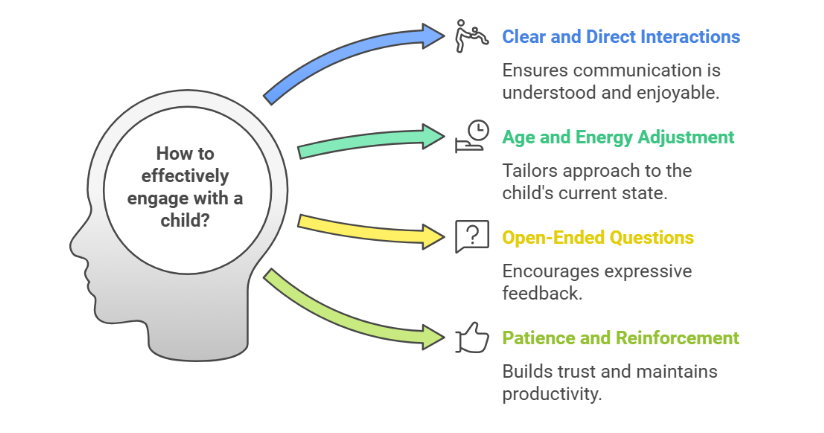
The document Facial Recognition is about how this technology is growing in different fields, like entertainment and security. It mentions examples such as Snapchat’s filters and Apple’s iPhone Face ID, and even suggests that the Holobox could be used for engagement monitoring in education and interactive storytelling. It also discusses privacy issues like data misuse, identity theft, and security, stressing the need for ethical guidelines and data protection. The document Research School Books for Designs/Elements/Colors looks at how school books are designed to make them easier to read and more interesting. It points out the importance of typography, visuals, and how color schemes are adjusted to age groups to help students engage with the material. The document Research Design Elements for Kids talks about how to design digital experiences for kids based on their age and development. It explains how to use visuals, clear fonts, and simple navigation to keep kids interested, plus the importance of storytelling and gamification for motivation. The Attention Spans in Children Aged 8–12 document tells us how long kids can focus on tasks. It shows that kids aged 8–10 can focus for 16–30 minutes, and kids aged 11–12 can focus a little longer, for 24–36 minutes. The document gives tips on how to help kids stay focused, like using interactive content, chunking tasks, and offering rewards. The Ethical Considerations of using AI in education deal with issues like accessibility, over-reliance on technology, data privacy, and bias. Even though AI can help personalize learning, it could also make inequalities worse and affect critical thinking. The document says that AI needs to be used carefully with proper regulation to support traditional learning. The next document outlines key UI Standards for children and interaction design guidelines for making interfaces that are good for kids. It suggests things like big tappable buttons, simple navigation, and positive feedback to match kids’ cognitive development and help keep them motivated. The document suggests focusing on simplicity and clarity. It recommends larger interactive elements and clear navigation for easier and more enjoyable experiences. In the document Guidelines for Interacting with Children in UX Contexts, it’s important to use simple language and avoid jargon to keep kids engaged. Asking open-ended questions, using relatable examples, and being flexible in approach helps create a supportive environment. The document Research UI/UX Educational Games for Kids talks about how to make educational games both fun and effective by using interactive features, instant feedback, and easy-to-understand design. Examples like Duolingo and Scratch are used to show how these ideas work. Finally, the document UI Holobox Guidelines provides tips for designing holographic user interfaces. It talks about using simple design, 3D layering, and accessibility to create user-friendly and inclusive experiences in holographic spaces.

What I Learned:

From this information, I learned how important it is to think about the audience when designing digital experiences. The research on how school books and educational games are made for different age groups showed me how content should be adapted to fit people’s abilities. For example, younger kids need bigger fonts and more visuals, while older ones can handle more complex designs. This will be useful for the virtual concert project, as it will help me design an experience that works for all ages and different levels of tech skills.

Why It Was Helpful?

This information helped me a lot with the project by giving me ideas on how to make the virtual concert more fun, easy to use, and secure. The facial recognition research gave me insight into how we can use technology like engagement monitoring in the Holobox, but also showed how important it is to protect people's privacy. The details on attention spans and usability taught me how to design an experience that keeps people engaged and is easy to navigate. I also learned how to create an immersive and inclusive experience, especially for people who might not be as familiar with virtual environments, making sure it’s both fun and accessible for everyone.

Investigation Document

Our design approach focuses on creating experiences that are age-appropriate and engaging for children, respecting their developmental stages and attention spans. We’ll use clear visuals, simple typography, and content broken into manageable pieces to keep things accessible. Storytelling will be woven into the material to spark interest, while a mix of visual and textual elements ensures kids with different learning styles feel included. Navigation will be intuitive, with immediate feedback, gradual difficulty increases, and meaningful rewards to keep kids motivated. At the same time, we’ll prioritize ethical considerations like safeguarding privacy and promoting social interaction over isolation. Testing will be flexible and child-friendly, creating a positive, comfortable environment to gather insights while ensuring kids enjoy the experience. As a part of the research method we also did a survey with ChatGpt. The interview with ChatGPT, acting as a primary school kid, gave us some really helpful ideas for our project. We learned that kids love activities that are fun, creative, and feel like an adventure. Things like games, storytelling, and hands-on activities make learning more exciting for them. They also want a holographic character that’s not just smart but also playful, interactive, and can do fun stuff like showing cool visuals or telling jokes. This helped us plan how to design the hologram so it’s more engaging and fits what kids actually enjoy. My role in the UX/UI design for this part of the project was really important because it contributed to the research process by focusing on how we can make the design accessible, engaging, and effective for children.

Ideation Phase

Brainstorming Ideas

At the beginning of the ideation phase, we kicked things off by brainstorming a variety of creative and educational ideas for the HoloBox. These ideas ranged from interactive 3D biology models and historical reenactments to coding games and virtual global exploration. Each idea aimed to engage children in unique and fun ways, blending education with entertainment to make learning more exciting and effective.

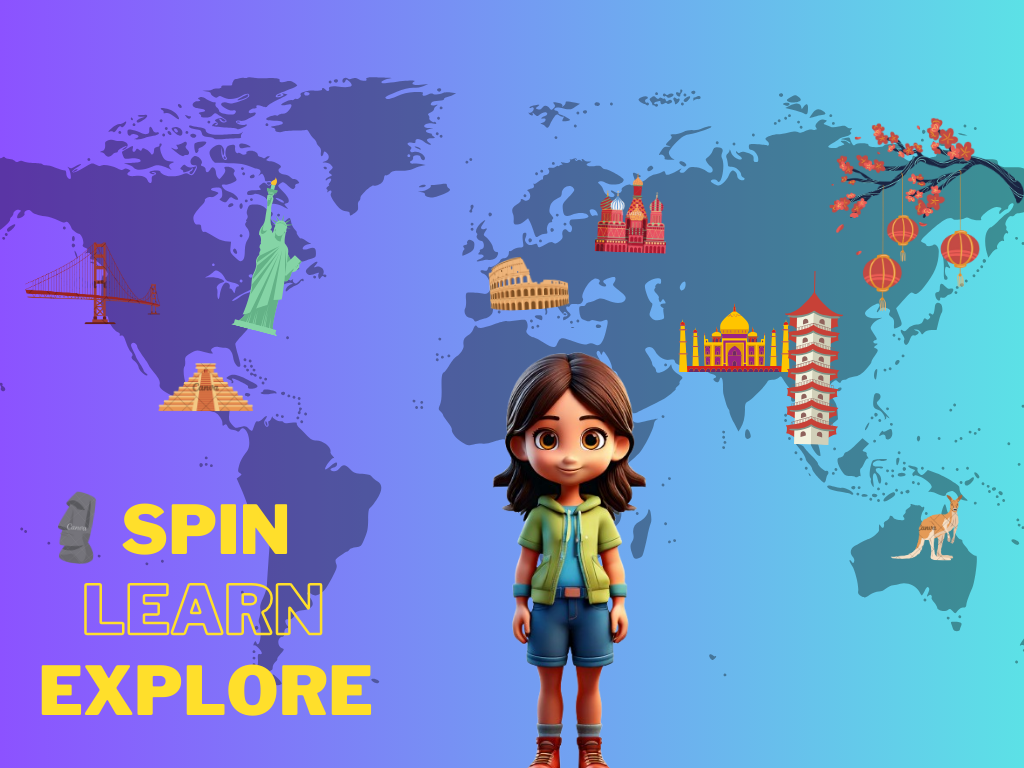
After compiling all these ideas, we voted on the three that stood out the most: Global Exploration, Martin Morning (Kids Show), and Logical/Coding Games. Global Exploration focuses on introducing children to different cultures, landmarks, and languages in a fun and immersive way. Martin Morning inspired the idea of having a character that changes roles daily, like an astronaut teaching space or a veterinarian teaching about animals. Logical/Coding Games were chosen to help kids develop critical thinking and problem-solving skills through interactive and educational play.

This brainstorming and selection process was essential for the project because it allowed us to narrow down our focus to ideas that best aligned with our goal of making the HoloBox both educational and engaging. By choosing these three concepts, we could create a solid foundation for the HoloBox experience, ensuring it would be interactive, diverse, and fun for children. This process also gave us clear directions for the next steps in developing the project.

User Scenarios

Based on the top three ideas from our brainstorming session—Global Exploration, Martin Morning, and Logical/Coding Games—and the personas we created, I came up with user scenarios to imagine how kids would interact with the HoloBox. These scenarios helped bring our ideas to life and showed how the HoloBox could make learning fun and interactive for children.

What I Learned:

Working on the user scenarios taught me how important it is to combine learning with play. For example, in the Global Exploration idea, I saw how storytelling and activities like solving puzzles or learning new words can make learning exciting. The Martin Morning concept showed me how variety and surprise can keep kids engaged and looking forward to what’s next. I also learned how much kids love being part of the experience—like coding their own rocket or asking questions—and how rewards like badges or collectibles can motivate them. It was clear that making things interactive is key to keeping kids interested.

Why It Was Helpful?

Creating these scenarios made our ideas more real and gave us a better understanding of what works and what doesn’t. They helped us focus on designing activities that are both fun and age-appropriate. Thinking about how kids would actually use the HoloBox made it easier to plan features that balance learning and entertainment. The scenarios also gave us a clear direction for improving the experience, especially by making it interactive and rewarding. Overall, they helped us feel confident that the HoloBox would be something kids would enjoy while learning at the same time.

Moodboard

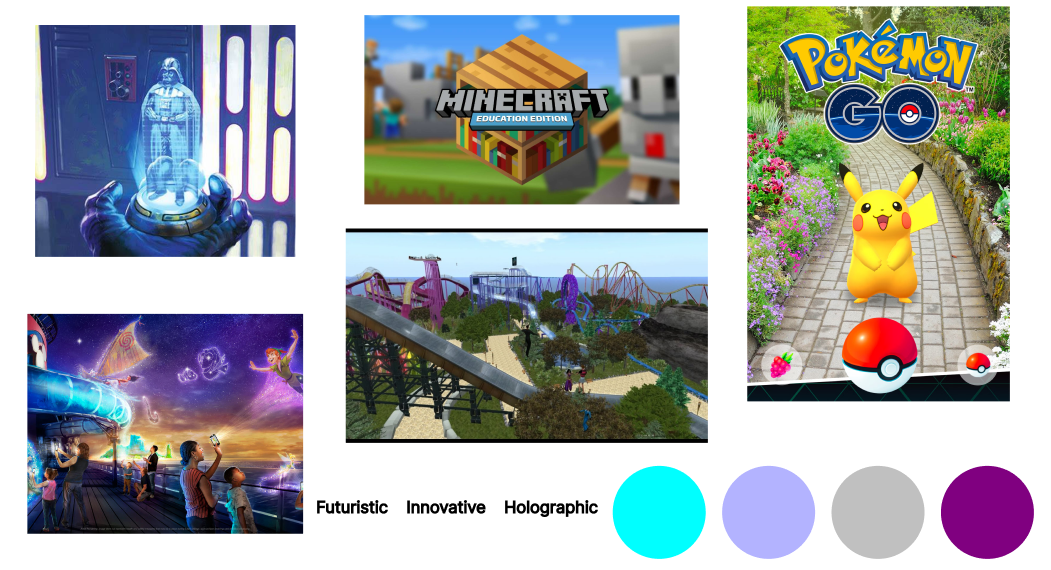
Based on our concepts and ideas, I decided to create a Moodboard to visualize the atmosphere and aesthetic of the HoloBox project. The mood board included images, color palettes, and keywords that reflect the interactive, futuristic, and playful nature of the HoloBox. It served as a way to communicate the vibe we wanted the project to have while also helping to refine our vision.

What I Learned:

Creating the mood board taught me how visuals and design elements can shape the identity of a project. For example, choosing vibrant neon colors and holographic effects reinforced the futuristic aspect of the HoloBox. Including visuals of children interacting with technology highlighted the importance of making the design relatable and appealing to kids. I also learned how different inspirations, like sci-fi movies or educational tools, could be combined to create something unique. Most importantly, this process helped me understand how to use design to balance creativity and functionality, ensuring the visuals not only look good but also communicate the purpose of the project effectively.

Why It Was Helpful?

The mood board played a big role in defining the project’s style and direction. It gave us a clear picture of how we wanted the HoloBox to look and feel, making it easier to make design decisions later. The color palette and imagery helped align the team’s vision and created a shared understanding of the aesthetic. It also helped us stay focused on designing an experience that feels futuristic, fun, and educational. By exploring keywords like "futuristic," "holographic," and "interactive," the mood board ensured we stayed true to our core ideas and gave us a foundation to build on for the next stages of the project.

Affinity Diagram

The affinity diagram, worked on by Saphi, was a valuable tool in organizing and synthesizing a variety of ideas we generated for the HoloBox project. The diagram allowed us to group similar concepts together, identify connections between different ideas, and prioritize the ones that aligned with our project goals. Through this process, we were able to refine our vision for the HoloBox, ensuring that the experiences we planned to offer would be both educational and engaging for children. This also helped us identify the types of content and activities that could be incorporated into the HoloBox, such as storytelling, interactive learning, and creative physical activities.

What I Learned:

From this exercise, I learned the importance of categorizing and organizing ideas early on in the project development process. By grouping similar concepts together, we were able to ensure that each idea served a distinct purpose in enriching the learning experience for children. The affinity diagram allowed us to better understand the relationships between different educational themes, such as science, history, and problem-solving, ensuring that the HoloBox would cover a wide range of subjects in an engaging way.

Why It Was Helpful?

This process helped the project by providing a clear structure for selecting and refining content that would be both educational and age-appropriate. It also allowed us to focus on creating interactive experiences that are aligned with our goals. The insights gained from organizing the ideas contributed directly to the development of concepts like the dinosaur story, global exploration, and logic coding games, making sure that these elements fit together cohesively and served our broader objective of creating a comprehensive learning tool for children.

Concepts Development

The Global Exploration concept by Omar and the Coding Game concept by Chris were created based on the brainstorming ideas and personas we developed earlier in the project. These two concepts were chosen because they aligned with our goal of providing engaging, educational, and interactive experiences for children using the HoloBox. Each concept reflects a different approach to combining fun and learning, with Global Exploration focusing on cultural knowledge and interactivity, and the Coding Game emphasizing problem-solving and logical thinking.

How These Concepts Were Developed

The Global Exploration concept was developed to give children a fun, hands-on way to explore different countries and cultures. Omar’s design incorporates a 3D holographic globe that children can interact with by selecting countries to explore. A friendly guide accompanies them throughout their journey, introducing them to the culture, food, and traditions of each location. The concept also includes quizzes to reinforce learning, helping children absorb information in an interactive and entertaining way. Meanwhile, Chris’s Coding Game concept was created with the intention of introducing children to basic coding principles through a fun, problem-solving game. Children use simple commands like "pick up" and "place down" to guide a robot in constructing a building, learning the concepts of loops and repetition in a playful, step-by-step manner. This concept was designed to make programming accessible and enjoyable, using intuitive interactions and real-time feedback to encourage children to think logically.

Why It Was Helpful?

These concepts have been crucial in shaping the HoloBox project by demonstrating how to combine education with engaging gameplay. The Global Exploration concept showed us how we could use interactivity to teach children about geography and world cultures, while the Coding Game highlighted the potential for making learning to code fun and approachable for young audiences. By integrating both cultural exploration and basic programming, we can appeal to a broad range of children with different interests. Moreover, these concepts helped us think about the importance of gamification and rewards, such as quizzes and badges, in keeping children motivated and excited to learn. They also provided insight into the types of interactive elements, like holographic visuals and dynamic feedback, that would make the HoloBox more engaging and effective as an educational tool. Through these concepts, we were able to define a clear vision for how the HoloBox could be used to create meaningful, fun learning experiences for kids.

Spacegame Concept

After getting feedback from the client, it was clear that our first ideas didn’t quite hit the mark. So, we decided to brainstorm more and came up with two new concepts: "Secret Sasha" and a space-themed game called "Astro’s Galactic Quest." I came up with the space game idea after talking it through with Will and Chris, and we thought it could be a great way to make coding fun and educational for kids.

In the game, players would guide Astro, a humanoid astronaut, on a journey to the Moon. They’d use basic coding commands to chart the course and overcome challenges. It was a way to teach coding while keeping kids engaged by introducing them to space facts along the way. We thought this would be a perfect fit for kids aged 8–12, especially those new to coding.

Why It Was Helpful?

The brainstorming sessions with Will and Chris helped develop this idea further, especially after the feedback from the client. It helped us focus more on combining interactive learning with fun gameplay, which was what the client seemed to want. Plus, it gave us room to think about future expansions, like missions to Mars or the ability for players to create their own routes. It really helped shape the direction of the project and made it feel more aligned with what we were aiming for

Secret Sasha Concept

The idea for "Secret Sasha" came from rethinking the initial concept. Instead of having children share their secrets with an AI, we flipped it. Now, Sasha, the character in the Holobox, shares their secret with the kids. Sasha might talk about struggles like losing a pet or having a first crush, and this makes the children think about their own feelings and how they would react in similar situations. This change made the interaction more meaningful and allowed kids to relate to Sasha and give advice based on their own experiences.

We chose to use a scripted system for Sasha’s responses instead of an open AI to make sure the responses were appropriate for the age group. With this approach, Sasha’s replies would be carefully selected, so there wouldn’t be any inappropriate content. We also limited the time to 15 minutes so that kids wouldn’t spend too much time with Sasha, allowing other children to take part and keeping the experience focused.

Working on "Secret Sasha" after getting the feedback helped make the project more focused and clearer in its direction. The main goal became to create something that wasn’t just fun, but also meaningful, helping kids build empathy and reflect on emotional situations.

Impact Assessment Phase

Spacegame's Impact

For this part of the project, I created and answered a set of questions regarding the impact of the space game, the Holobox, and the users. The goal was to analyze how the game functions, its educational value, and how the immersive environment provided by the Holobox contributes to the experience.

What I Learned:

By creating and answering these questions, I was able to better understand how the game engages children. The process helped me identify important aspects of the project, such as the game's ability to teach coding while making it fun and accessible. It also highlighted how the Holobox enhances the experience by providing an immersive, hands-on environment for learning.

Why It Was Helpful?

The impact questions were helpful because it forced me to think critically about the game's target audience, the user experience, and how the Holobox can make the learning process more enjoyable. It also made me realize the importance of creating content that is both educational and engaging, ensuring that kids remain motivated while learning. By answering these questions, I gained insights into how the game could be improved to better meet the needs of the users, and it also gave me a clearer perspective on the overall direction of the project.

Spacegame Code Choices

Chris’s document on the space game provided key insights into how to make the educational experience more engaging and effective for kids. It emphasized the importance of incorporating a story alongside coding challenges, making the game more immersive and motivating. The inclusion of fun facts about space sparked curiosity, linking the learning experience to real-world knowledge.

This document played a crucial role in shaping the project. It provided valuable feedback that helped refine the game’s design and learning objectives, ensuring it was both educational and enjoyable. The insights into user interaction and the use of Holobox technology have made the game more accessible, interactive, and engaging for children. These contributions have been instrumental in improving the project’s direction and its potential for future development.

Why It Was Helpful?

The document also helped refine the game’s educational goals, such as computational thinking and problem-solving. It made clear that providing multiple chances before a “failure” (crash/explosion) would better align with the target age group’s preferences for visually engaging elements. Additionally, the idea of customizing characters and varying difficulty levels would eventually add depth to the gameplay.

TICT Holobox Quickscan

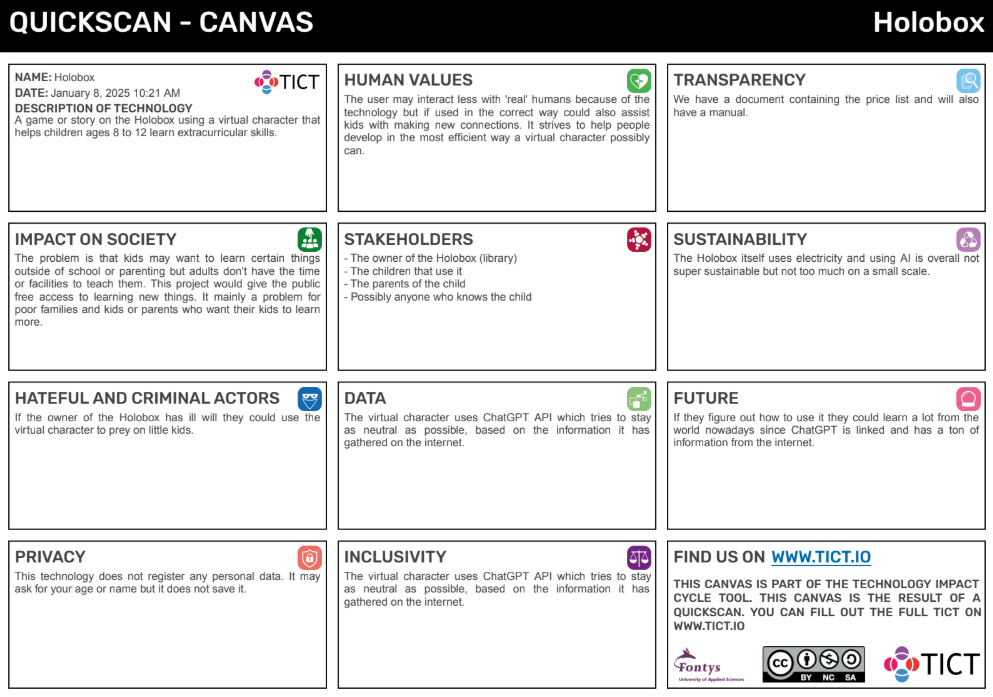
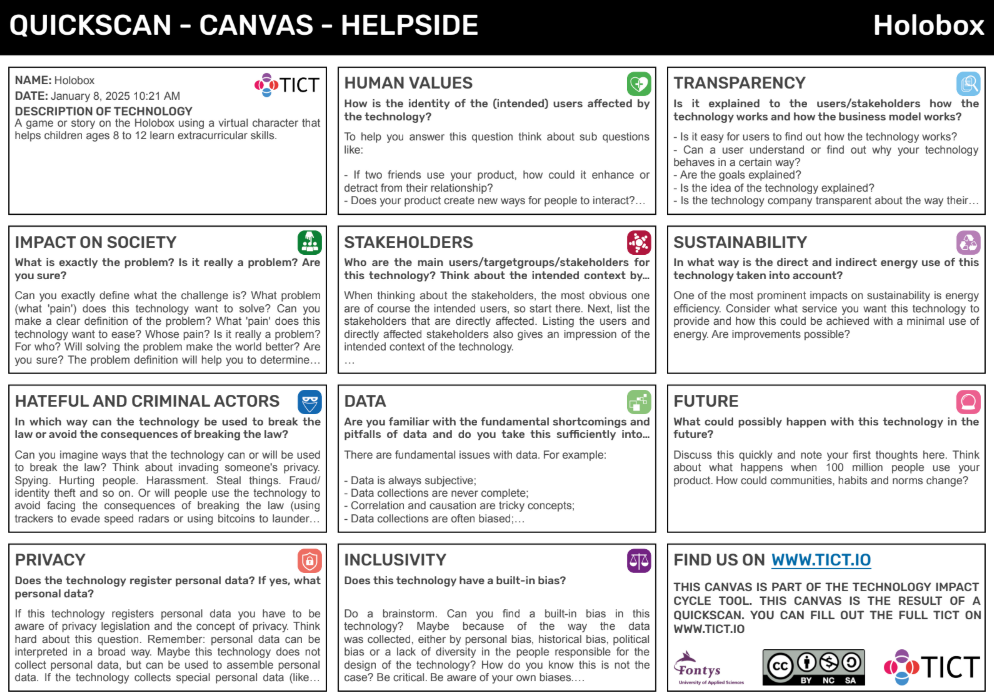
Maud’s reflection on the Holobox was an important step in analyzing the potential impact of the technology. Through a thorough assessment, she examined various aspects, including the societal challenges it aimed to address, its inclusivity, privacy concerns, and its broader ethical implications. By breaking down the key components, Maud was able to provide valuable insights that guided the project's development.

Why It Was Helpful?

Maud's analysis had a significant influence on the project. Her examination of the technology's societal and ethical dimensions allowed the team to better understand its potential and limitations. By identifying concerns related to privacy, inclusivity, and sustainability, Maud helped the project ensure it would be implemented in a responsible and effective way. Her input ultimately shaped the direction of the Holobox, fostering a stronger and more conscientious foundation for its future development.

Implementation Phase

Prototype 1: VR Chat

Will’s attempt to create the first prototype for the space game in VRChat was a great learning experience, even though it didn’t go as planned. His idea was to use a VR headset and VRChat to record a character interacting with the audience, making it feel like the perspective of the Holobox. The plan was to start on Earth, deliver some educational lines, and finish on the Moon with interesting facts to engage kids. Will showed a lot of creativity and effort by borrowing a VR headset and spending around five hours searching for a model that fit our project. However, things didn’t work out during the recording stage. The VRChat camera controls were only available on PC, and unfortunately, his laptop couldn’t run the game properly. This setback made us rethink our approach and decide as a team to try something different for the prototype.

What We Learned:

Even though the prototype didn’t work, it taught us a lot. We realized how important it is to check if the hardware and software we plan to use are compatible before diving in. It also showed us the importance of having backup plans when working with tech that might require high-end equipment. Most importantly, it helped us think more creatively and adapt quickly when things don’t go as expected.

Why It Was Helpful?

Will’s work played a big role in shaping the project. Exploring VRChat gave us a better idea of the tools and challenges involved in creating immersive scenes. It also sparked a team discussion about how we could approach the prototype differently, which helped us come up with new ideas that were more practical. Even though the first prototype didn’t turn out as we hoped, it gave us a lot of insight and set us up to tackle the next steps with a stronger plan. It was a great reminder that even failed attempts can push a project forward.

Prototype 2: Coding And Voiceovers

After the unsuccessfull attempt of Will to use VR Chat for the first prototype Chris layed the foundations of actually doing the game with code. In the mean time, me and Will worked on the voiceovers as I also had to rework the script a few times, after we got a feedback from the client that it was too long and he also suggested to make it more playful in order to engage the younger audience better. At first, Will recorded himself reading it, but after the feedback I used AI from a website called speechgen.io to do that for us. Then I mixed it with the lypsinc video that Daniella did with the character that she also made some improvements to. After that I put the videos in the code that Chris already made. From the button below the text you can check our final version for the spacegame.

Based on the feedback from the client we also worked on an alternative concept for a safary game. Following our final client presentation, the feedback that we received from the client was, “How essential is it for the game to have a space theme? Could it work just as well with a different setting?” This feedback prompted us to explore an alternative concept for the game, maintaining the same educational objectives but presenting it in a different theme. The idea was to demonstrate that the theme is just a creative layer, not the core of the game. Regardless of whether it’s space or another setting, the primary focus remains on achieving the learning goals, such as fostering computational thinking, problem-solving, and logical reasoning skills.

What We Learned:

One of my biggest personal challenges during this process was learning how to mix the audio with the lip-sync video that Daniella had created and improved upon. This was something I had never done before, and it took trial and error to figure it out. On top of that, I didn’t know how to integrate the finished videos into the code that Chris had already developed, but I eventually figured it out by researching and experimenting. This entire experience taught me a lot about problem-solving, collaboration, and stepping outside my comfort zone to learn new technical skills. We also realized that being open to alternative ideas, like the safari game, helped demonstrate that the theme was just a creative layer while keeping the core focus on educational objectives like computational thinking, problem-solving, and logic skills. This process showed how feedback, teamwork, and adaptability are key to refining and improving a prototype.


Project Reflection

Working on this project was both challenging and rewarding, giving me the chance to learn a lot about teamwork, research, and technical skills. From brainstorming ideas to creating prototypes, every step of the process taught me something new.

For the UX/UI part, my role was focused on research. I looked into how we could make the experience fun and engaging for kids aged 8 to 12. I explored what works best for that age group, like making sure the interface would be simple, interactive, and easy to navigate. Even though I didn’t design anything myself, my research helped guide the team’s decisions and made sure we kept the target audience in mind throughout the project.

During the prototyping phase, I faced some technical challenges that I had no experience with before. For example, I had to figure out how to mix audio with a lip-sync video and how to include those videos in the code. At first, it felt overwhelming, but I tried different tools and ended up using AI voiceovers from SpeechGen.io. Then, I worked with Daniella’s improved character animations and synced everything together. It took some trial and error, but by the end, I had learned how to do these things, which felt like a big achievement for me.

One of the biggest lessons came from the client’s feedback. They questioned why the game needed to have a space theme, which made us rethink the project. As a result, we created a safari-themed alternative to show that the theme was just a layer on top of the core learning goals, like problem-solving and computational thinking. This experience taught me how important it is to stay flexible and open to new ideas.

Overall, this project taught me the value of research, problem-solving, and adapting to feedback. Even when things didn’t go as planned, I found ways to figure it out, and I’m proud of the progress I made.